

With the rise of digital work, handling large files, especially PDFs, can be challenging, especially when using mobile devices. Whether you’re sharing documents via email or uploading them online, file size limits often get in the way.
Fortunately, compress PDF files is a simple solution that saves storage space and makes file sharing easier. In this article, we’ll show you how to quickly reduce PDF file sizes directly from your mobile device, so you can work more efficiently on the go.
Benefits of compressed PDF files
In today’s world, working on the go has become common. We depend more on devices like smartphones or tablets to finish work quickly. However, opening or emailing large PDF files on mobile devices can often be challenging.
The solution also lies in compressing your PDF files. Let us know how and why compressed PDF files are better:
- Mail Data Limitations: As we all know, many mail services do not allow sending email attachments larger than 25 MB. Alternatively, cloud services enable users to send files over the web. Not using file compression makes the process of sending bulk information more time-consuming. Not compressing your files can cause problems for your recipients when sending data online or over the network.
- Speedy Transfers: Compressed files allow you to store files more efficiently on a local device and send large documents and data over the Internet faster.
- Improved file integrity: Compressed files can corrupt when sent over the web. Zipped files maintain their integrity and ensure that your data remains safe.
- Saving storage space and money: File compression is a great solution for businesses that handle, process, and store large documents. When hundreds or thousands of documents circulate in your organisation, storing them all requires a large amount of disk or cloud space, which you must pay separately for. Compressing files allows you to use your storage space more efficiently and save money.
- Bandwidth Conservation: File size reduction benefits bandwidth-constrained websites, making sharing PDF documents cost-effective.
Compressing large files when uploading them to a webpage or sending them via email is better. As mentioned earlier, most common email systems limit the size of attachments. Therefore, file compression provides a way to send multiple files en masse instead of one by one.
Many common programs limit the size of data in various ways. Due to technological advancements, this work can also be done on mobile devices.
How to compress PDFs on your mobile?
Adobe Acrobat Compress PDF online tool lets you compress PDF files directly from your mobile browser. Follow these easy steps to compress your PDF file online:
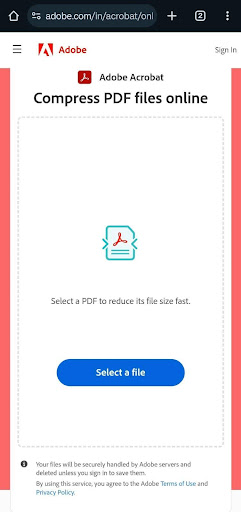
- Open your mobile browser and go to Adobe Acrobat Online PDF Compressor.
- Tap the ‘Select a file’ option to upload your PDF from your device storage, cloud storage, or Google Drive.
- Select the PDF file whose size you want to reduce.
- After uploading, Acrobat will automatically reduce the size of the PDF. If you need the smallest file, choose a higher compression level.
- Sign in to download or share your compressed PDF file.
If you need the smallest file, choose a higher compression level. If you want to reduce the file size while maintaining great quality, you can choose medium or low compression. You can then easily work with, store, or share the compressed file.
Reduce PDF file size and share it easily, directly on your mobile
To share your PDF documents, in many circumstances you may need to compress their size. And if you want to do that on your mobile phone, then it is necessary to follow a proper procedure for that.
In this article we told you how you can do this work on your mobile. We hope this information will help you to compress your PDF easily.