

Artificial intelligence has revolutionized video creation, offering powerful tools for content creators to easily create high-quality, engaging videos. A free AI Video Generator, like Vidnoz AI, uses machine learning algorithms to automate the video creation.
One key feature of using AI tools in video creation is the time and effort they can save. In this article, we’ll explore Vidnoz AI Video Generator and highlight its best features and more. Ensure to read this guide to the end to learn more about Vidnoz AI.
Free AI Video Generator for Everyone— No Cost Involved
Vidnoz AI is a web-based free AI Video Generator that allows users to create AI videos quickly. This tool has some of the best custom AI avatars and voices, with more than 1000 unique AI models. It also provides native support for more than 140 languages, including English, Urdu, Hindi, Turkish, and more.
Vidnoz AI makes the entire video creation process effortless and intuitive. The program is best for making how-to videos, marketing materials, and training videos. This easy AI video editor allows users to cut and trim footage, change backgrounds, alter AI-generated scripts, and more.
Top Features of Vidnoz AI
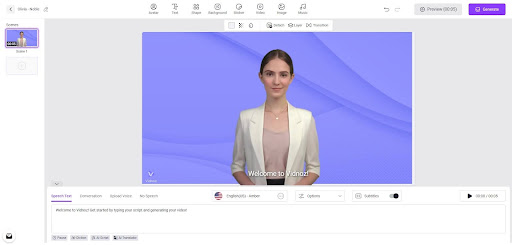
Here are the top features of Vidnoz AI:
- Customizable Templates: Vidnoz AI offers 2800+ customizable templates catering to various genres and styles. Whether it’s a promotional video, a tutorial, or a social media post, users can choose the template that fits their needs.
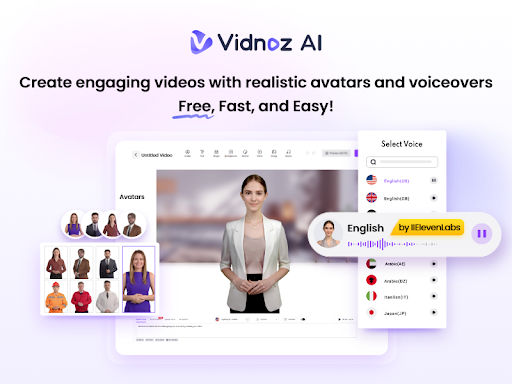
- Realistic AI Voices: Many AI Video Generators lack realistic AI voices. However, with Vidnoz AI, you will find 1240+ realistic AI voices, powered by Elevenlabs, Google, and Microsoft.
- AI Avatars: With this program, you get 1200+ AI Avatars to narrate your videos. The best part of this program is that you can create personalized avatars for your videos.
- Avatar Lite: Easily create your own digital twins speaking in your tone.
- Language and Accent: The program offers narration in over 140 languages with different accents. It also allows you to translate videos into English, Turkish, Urdu, Hindi, Arabic. For more information,Free video edit click here: ai video generator
- Voice Cloning: You can also enjoy the voice cloning feature that is available in multiple tones. It can replicate a voice with 99% accuracy which is more than other AI tools.
- Text-to-Speech: This feature allows you to convert your text into a high-quality speech. The speech will sound realistic, natural, and life-like.
- Ultra-Fast Video Generation: With this program, you can generate videos within 1 minute. Vidnoz AI offers a free version, allowing users to create 3-minute videos every day. Further, all the videos generated from this program are free for commercial use.
- User-Friendly Dashboard: Vidnoz AI is an easy-to-use program that allows beginners and professionals to create high-quality videos easily. It requires no software downloading because it is a web-based program.
- AI Script Generator: You can use this feature to generate ideas for your videos. Just type your text, select a tone, choose a language, and the tool creates scripts automatically.
- Best Video Editor: Vidnoz AI has an amazing video editor that allows users to edit AI-generated videos accordingly.
Pros and Cons Vidnoz AI
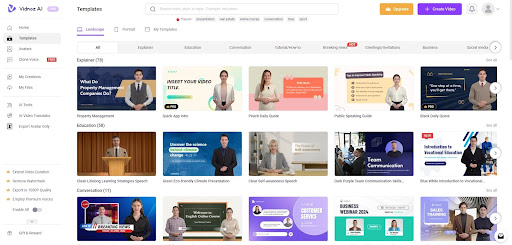
Below we have mentioned the top pros and cons of using this software.
Pros
- The program can make videos for you within a few clicks
- Transform your text into a realistic and high-quality speech
- Customize templates and avatars according to your requirement
- Allows you to create videos in 140+ languages
- Offers voices of singers, politicians, actors, and more
- Has a free version that allows you to create free videos every day
Cons
- If you want advanced features, you have to purchase its paid plan
- An Internet connection is required to use it
Vidnoz AI Pricing
| Pricing | Plan | Ideal For |
| Free | Free | Ideal for beginner users, allowing them to try the tool |
| $19.99/mo | Starter | Best for content creators and marketers |
| $56.99/mo | Business | Perfect for users who want to create longer-duration videos |
Use Cases of Vidnoz AI
Using Vidnoz AI, users can create free videos. Here are some use cases of Vidnoz AI:
- Content Creation for Social Media
Vidnoz AI allows influencers to produce content quickly by creating personalized content for their followers and sharing videos on platforms like Facebook, Instagram, TikTok, and more.
- Educational Content
Educators can use Vidnoz AI to create video lessons for online courses, enhancing the learning experience. They can also produce explainer videos with Vidnoz AI to break down complex concepts.
- Product Demo
Businesses can create product demo videos that highlight the product’s features and benefits. They can also generate product ads and share them on platforms like Instagram, TikTok, and Facebook.
- Workout Videos
Fitness trainers can create workout videos using Vidnoz AI, explaining workout plans, diet plans, and more.
- Training Videos
The department can create training videos for their employees where they can explain all the information about the company and more.
Is Vidnon AI Worth It? – Final Thoughts
Vidnoz AI has been proven to be an amazing tool for video creation. This program offers powerful features, allowing users to create videos for different scenarios. Whether looking to create product demo videos or educational content, this program is best for everyone. This tool now features a new Twin Mode option, perfect for creating conversational videos. Simply upload your own video, and let the tool handle the rest.